|
|
USER EXPERIENCE
Improved Home Screen
Quickly access your projects and manage your content with a more intuitive home screen. Now, when you access your content from the home page, you’ll have more options to manage it. For example, you can access your “Recently Opened” files and “My Content” and use the three-dot menu for actions, such as open item in a new tab, create drawing from part, view information, or delete content. When you view all your content, you’ll get a dedicated page with an option to filter for just physical products, drawings, or top-level Assemblies. You can also jump back to the home screen anytime using a new shortcut in the action bar. These improvements help you find your work faster, organize it with ease, and stay focused on designing.
Additional User Experience Enhancements
Materials are now deployed automatically in the background the first time an admin starts a session, ensuring the full materials library is ready to use without any manual setup.
Improved Action Bar layout and usability. The Subdivision tab has been moved to a more intuitive position, command labels are now enabled by default for makers, and several tooltips have been refined to provide clearer guidance.
Mouse control preferences are now automatically set to SOLIDWORKS for Students, Makers, and Education users to provide a familiar and consistent model navigation experience.
Improved performance and reliability of automatic restore points. Automatic restore points now save in the background every few minutes without blocking you from interacting with the session. You will also receive a notification when restore points are saved and if a save fails.
Improved system stability and crash handling. When a minor server error occurs, the active command is canceled, and you are returned to the default command. When a major server error occurs, you receive a warning, and an automatic restore point is saved before the session disconnects.
Added a new notification to explain long load times caused by VM scaling. When increased demand delays session startup, you will now see a message stating that new resources are being allocated and your session is in the queue.
PART & ASSEMBLY DESIGN
Convert Imported Geometry into Editable 3D Models (Beta)
You can now convert imported BREP geometry into fully editable 3D models, so you can make design changes directly in xDesign. With a new command, you can easily convert BREP geometry into fully editable, feature-based models. Once converted, this enables you to modify any geometry by editing the corresponding features, and even roll back to a specific point to make changes.
This new feature gives you the flexibility to iterate and refine designs without starting from scratch, saving time and making it easier to work with imported data. Stay tuned, we’re going to continue making more improvements in this area as well.
New Quick Measure Tool
The new Quick Measure tool is inspired by the popular Quick Measure tool in SOLIDWORKS Design. Now in SOLIDWORKS xDesign, you can quickly access measurements for selected geometry without opening the full Measure tool. For example, if you have a cylindrical face selected, you could get the location of the face and the area of the face. And then if you click on another entity, the Quick Measure tool will show the distance between entities. Maybe you’re using that measurement in a different feature, so you can quickly copy the measurement from the Quick Measure tool and paste it into another feature dialog.
The Quick Measure tool displays length, distance, angle, surface area, and XYZ coordinates directly beneath the breadcrumbs for easy visibility. Use the Quick Measure Capsule to see key values at a glance and expand the Quick Measure Panel for more detailed measurement information, helping you work faster and make informed design decisions.
Additional Part & Assembly Design Enhancements:
Improved the Image to 2D Mechanism by adding the ability to cancel the command if preview generation takes too long and adding an “Insert Picture” option in the contextual menu to insert images while using command parking.
Added the ability to select files from 3DDrive when using the “Import in the Background” option, allowing you to continue working while importing files from 3DDrive.
Updated the styling of the robot modifier to improve usability and make it easier to interact with.
If a component with a single set is resolved before it’s activated, the set will be expanded automatically.
Fixed several issues with Make Component functionality to improve reliability when creating components from assembly-level geometry, with a focus on resolving external reference errors.
Automatic View Labels and Settings
Automatically generate clear, consistent, and standards-compliant view labels for section, detail views, and more, with no manual setup. Use the new Edit View Label in the Context menu to control label text, format, and style. Updated system and document options let teams define company-wide standards, say, if you have specific naming conventions, you can specify at a company-wide level, ensuring every drawing follows the same convention.
For example, if you’re creating a section view, and you add your section view lines on top of one view, and then that corresponds with a section view that’s next to it, it will automatically be named correctly. And the same goes for the detail view. In addition, you can now edit that text.
These enhancements will help you deliver faster detailing, fewer errors, and more uniform drawings.
Improved Standard Initialization and Updates
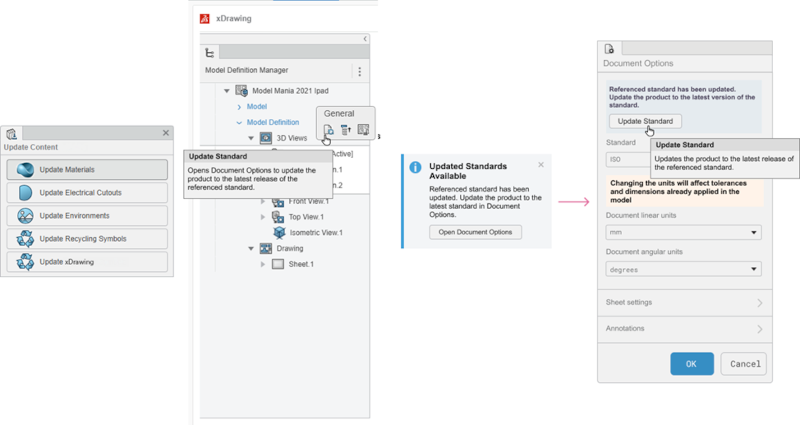
Getting new users set up to create Annotation Sets is now quicker. Admins can automatically create all required xDrawing standards during Admin setup, ensuring every user can immediately create Annotation Sets without waiting for manual initialization. A unified update content workflow now keeps xDrawing standards current across releases while preserving existing settings, reducing admin overhead and preventing workflow disruptions. Users opening older Annotation Sets are guided with clear prompts and a simple update standard action to bring documents up to date. Together, these improvements deliver a smoother, more reliable experience for teams, classrooms, and large organizations alike.
EXTENDED REALITY (XR)
Last year, we introduced extended reality (XR) functionality in xDesign, which enables you to enhance design reviews and spatial understanding with the ability to visualize your models in virtual reality (VR) or augmented reality (AR). In this functional delivery, we’ve added a number of cool capabilities as follows.
Hand Tracking and Free Drag
You now have the freedom to use your hands to interact with your model without the need of controllers with new Hand Tracking mode. Whether your controller batteries died or you just want to use your hands, you can now control your models with hand gestures. This enhancement also allows users to leverage headsets that don’t include controllers like the Apple Vision Pro.
In addition, you can experience your model’s kinematics and mates with the ability to drag portions of your model and see the constrained movements that your real product will have once its built. This will allow you to gain insights into product scale and kinematics leading to important design improvements earlier in the process.
Section View in XR
Dig deeper into your model with the ability to section models in your XR session. Simply use your controller to orient and place the section to show the internal construction of the model. This immersive experience helps you have more control over the section plane and explore the sectioned model.
|
|
 |小黑屋|手机版|Archiver|机械荟萃山庄
( 辽ICP备16011317号-1 )
|小黑屋|手机版|Archiver|机械荟萃山庄
( 辽ICP备16011317号-1 )


 发表于 2026-2-21 09:47:10